sftp
Browse directories on SSH servers and transfer files over SFTP, through your own ssh.
manycommander browses directories on SSH servers over SFTP, through the ssh you already
use. Your ssh_config with its Include and Match blocks, your keys and agent, security
keys, certificates, known_hosts and ProxyJump all apply unchanged. manycommander adds no
SSH code of its own.
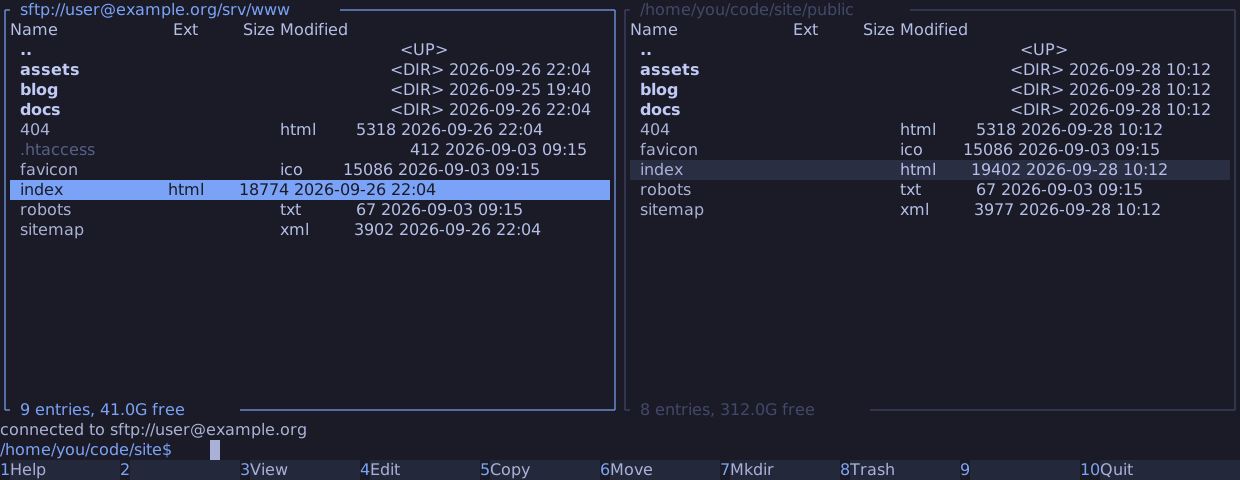
Connect
Type an address on the command line and press Enter:
cd sftp://user@example.org/srv/www
| Part | Rule |
|---|---|
user@ | Optional. Letters, digits, ., _ and -, at most 64 bytes, not starting with - |
| Host | A host alias from your ssh_config, or a DNS name: letters, digits, ., _ and -, not starting with -. An IPv6 address goes in brackets |
:port | Optional, 1 to 65535 |
| Path | Optional. None, /~ or /~/dir starts in your login directory; anything else is absolute. Percent-encoded bytes such as %20 are decoded |
Anything else, such as a query or a fragment, is refused with "not a supported sftp://
address". The strict rules keep an address from reaching a shell through a ProxyCommand or
Match exec line in your ssh_config.
A server place also opens from a bookmark: Insert in the
go-to-directory dialog on a server
panel bookmarks its address. Alt+Left and Alt+Right return to server places in the
panel's history. Nothing else connects: not the start, not a restored tab, not the quick
view.
Passwords and host keys
manycommander hands the terminal to ssh for the connect, as it does to the pager for F3:
- The screen shows
connecting to sftp://user@example.org ... (Ctrl+C cancels). - ssh asks on the terminal for what it needs: a passphrase, a password, a new host key or a touch of a security key. manycommander never sees what you type.
- When the server answers, manycommander takes the terminal back and shows the directory,
with
connected to sftp://user@example.orgon the status line.
When ssh fails, or you press Ctrl+C, ssh's messages stay on the screen above
[connection failed] press Enter to return, and the panel stays where it was. ssh's own
host-key checking decides; manycommander never relaxes it.
With a ProxyJump or ProxyCommand, Ctrl+Z at a password prompt can stop the proxy but
not ssh, because OpenSSH runs the proxy in ssh's process group. Press Ctrl+C, or Ctrl+Z
again, to end the connect.
After the connect, ssh runs in the background. An ssh that wants the terminal again, for
example to ask about a ControlMaster connection, stops there, and the operation that waits
for the server waits with it. Esc cancels the operation; when the server stays silent for
2 s after that, manycommander ends the connection with "connection lost".
Browse
| Key | In a server panel |
|---|---|
Enter on a directory, Backspace, Alt+Up | Navigate. At /, .. returns to the local directory the tab showed before |
Enter, F3, F4 on a file | Download a copy into a private directory and open it in $PAGER or $EDITOR |
Space on a directory | Its size, by a walk on the server; Esc stops it |
Ctrl+R | Read the directory again; reconnect a lost connection |
Ctrl+T | A new tab on the same connection |
Alt+Enter, Alt+P | Insert the quoted name, or its quoted path on the server |
Alt+Q | Load the file into the quick view |
The title shows the address, such as sftp://user@example.org/srv/www. The footer shows the
entry count, the server's free space when the server reports it, and the names the panel
could not show: a name from the server that holds / or a NUL byte. A listing stops at
1,000,000 entries.
The command line runs in the tab's local directory: a shell command never runs on the server.
cd with a relative path moves on the server, and .. above / continues in the local
directory. A path that starts with /, ~ or $, or none at all, is local.
F3 or F4 of a file larger than 256 MB asks before it downloads the copy.
Transfers and changes
| Key | What it does |
|---|---|
F5 from a local panel into a server panel | Upload |
F5 from a server panel into a local panel | Download |
F6 from a local panel into a server panel | Upload, then delete each local source whose upload is complete. Best-effort: see durability |
F6 from a server panel into a local panel | Download, and keep the remote sources: "remote sources kept: the server cannot identify them" |
F6 between two panels on the same server, Shift+F6 | Rename on the server |
F7 | Make directories on the server |
Shift+F8 | Delete on the server, after you type delete |
F8 | Refused: "no trash on the server; Shift+F8 deletes permanently" |
The destination field of an upload takes a path on the server. The confirm dialog of every move between hosts says that the move is best-effort before it starts.
F4 on a server file opens a copy in your editor. When the editor exits and the copy
changed, manycommander asks what to do with it: Upload it over the server's file, Save as
name (1) next to it (offered when the server's file changed since the download), or Keep
the local copy, whose path the status line then shows.
What uploads, renames and deletes guarantee, and where the server makes them weaker than on a local disk, is on the file operations page.
These are refused in a server panel:
| Key | Message |
|---|---|
Shift+F4, Alt+A, Alt+L, Ctrl+M, Alt+F7, Alt+O | "not on a server" |
F5 within one server | "no copy on the server; copy through a local directory" |
F5 or F6 between two servers, or between an archive and a server | "copy through a local directory" |
Shift+F2 by content | "not on a server"; compare by date and size works |
Connections
- At most 4 connections are open. A connection that nothing uses any more, no visible tab, load, job, view or preview, stays open for a quick return. A fifth connect closes the least recently used of those; when all four are in use, it is refused with "4 connections are open; close a remote tab".
- An address with the same user, host and port as an open connection uses that connection.
- A lost connection keeps the panel's rows, and the footer says "connection lost -- Ctrl+R reconnects". The verbs that need the server are refused until then. manycommander never reconnects on its own.
- A job that loses its connection fails its remaining entries with "connection lost", and leaves no partial local file.
- On exit, a server tab is saved as its local directory. The next start does not connect.
The ssh command
manycommander starts ssh by its argument list, never through a shell:
ssh -oForwardAgent=no -oForwardX11=no -oClearAllForwardings=yes -oPermitLocalCommand=no
    -oRequestTTY=no -oRemoteCommand=none -e none [your sftp.ssh arguments]
    [-l user] [-p port] -s -- host sftp
These fixed options switch off what a file transfer does not need: agent and X11
forwarding, port forwardings, local and remote commands, a terminal and the escape
character. Command-line options win over ssh_config, and ssh keeps the first value it
sees for an option, so the fixed options win over your configuration and your own
arguments. They never relax host-key checking or authentication.
sftp.ssh in the config file replaces the program and
adds arguments, which come after the fixed options.