archives
Browse zip, tar, compressed tar and 7z archives as read-only directories, view their members and extract them.
manycommander opens an archive as a read-only directory. You browse it with the usual keys,
view its members, and extract them with F5. Nothing ever writes into an archive.
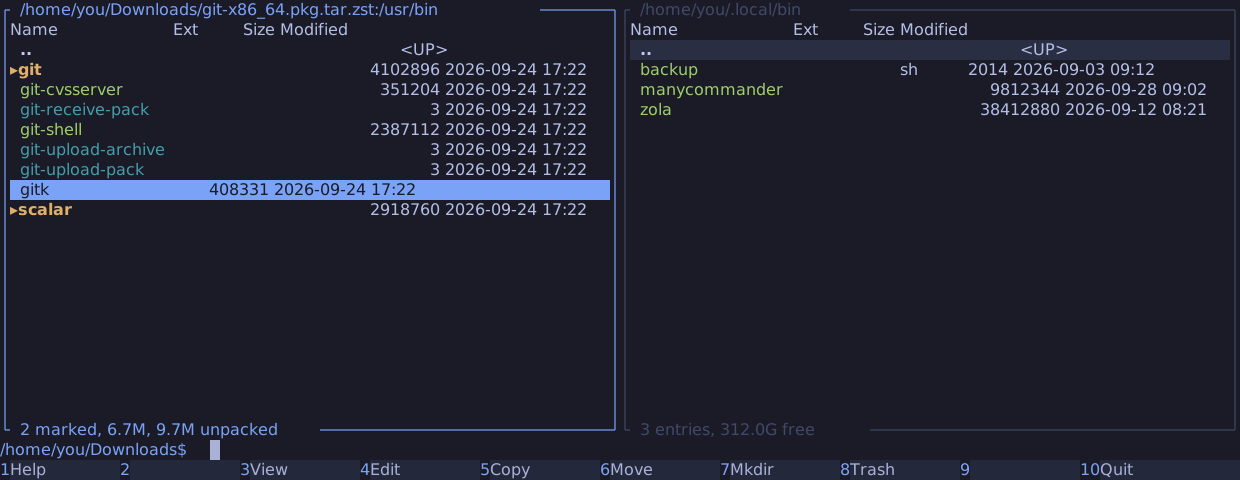
Open an archive
Enter on a file whose name ends in one of these opens it. The names match in any ASCII
case.
| Format | Names | Members are read |
|---|---|---|
| zip | .zip, .jar, .apk, .whl | Directly, from the central directory |
| tar | .tar | Directly |
| Compressed tar | .tar.gz, .tgz, .tar.zst, .tzst, .tar.xz, .txz, .tar.bz2, .tbz2, .tbz; pacman's .pkg.tar.zst is a .tar.zst | In one pass through the whole stream |
| 7z | .7z | By block: a block decodes from its start |
Alt+O opens any file as an archive, such as an .epub, a .docx or a .crate, which are
zip or tar files under another name.
Before it lists anything, manycommander checks the content: the format's magic bytes, and
for a compressed tar a tar header in the first decompressed block. A file that fails the
check does not open. The panel stays where it was, and the status line names the format the
name promised, such as "not a zip archive", or "not a supported archive" after Alt+O. To
open such a file with its desktop application instead, type xdg-open on the command line,
press Alt+Enter to insert its quoted name, and press Enter. Only regular files open as
archives: Enter on a symbolic link named x.zip still runs xdg-open.
The panel title shows the archive and the directory inside it, such as
/home/you/Downloads/git-x86_64.pkg.tar.zst:/usr/bin.
| Key | In an archive |
|---|---|
Enter on a directory, Backspace, Alt+Up | Navigate. At the archive's root, .. returns to the directory that holds the archive, with the cursor on it |
Enter, F3, F4 on a file | View or edit a copy of the member |
F5 | Extract into the other panel |
Space on a directory | Its size, from the index at once |
Ctrl+R | List the directory again; read the archive again when it changed on disk |
Alt+Left, Alt+Right | The panel's history; an archive in it opens again |
Ctrl+Q, Alt+Q | The quick view of a member |
On the command line, cd with a relative path moves inside the archive, and .. above its
root continues in the directory that holds it. An absolute path leaves the archive. Commands
run in the directory that holds the archive.
Reading an archive
A zip lists at once from its central directory. A tar lists by reading every header, and a
compressed tar only by decompressing all of it, which takes seconds for a large .tar.xz or
.tar.bz2. The rows of the directory you look at appear as they are found, and the footer
shows the progress, such as reading archive: 48 of 98 MB. You can enter a subdirectory
while the scan runs. Esc stops the scan and returns the panel at once.
manycommander keeps the last four archives it read in memory, up to 128 MB, so leaving an
archive and coming back is instant. It also keeps the archive open, so a file that replaces
the archive's name does not change what the panel shows. When a refresh sees that the archive
changed on disk, the panel says "the archive changed on disk; Ctrl+R re-reads", and Ctrl+R
reads it again.
The footer shows the entry count, the unpacked size of the directory, and the members that
are not shown, such as 3 members not shown: unsafe path:
| Reason | Member |
|---|---|
| unsafe path | A name with a .. component, a NUL byte, or a component that is no valid file name, or a member below a member that is not a directory |
| conflicting member | A later member that would replace a directory with children by something else |
| sparse member | A GNU sparse file |
| unsupported member type | A tar or 7z member of a type manycommander does not know |
| link target too long | A symbolic link whose target is longer than 4096 bytes |
| damaged member | A zip entry whose local header does not read |
Device, FIFO and socket members are listed, but never extracted.
A leading / is dropped from member names, and the footer counts the members that had one.
Of several members with the same name, the last one wins, as in tar. Directories that the
archive does not store itself show no date. A listing stops at 1,000,000 entries.
View and edit a member
Enter, F3 and F4 on a member copy it into a private directory,
$XDG_RUNTIME_DIR/manycommander/view/, and open the copy in $PAGER or $EDITOR. The status
row shows the progress, and Esc cancels. A member larger than 256 MB asks first. Without
XDG_RUNTIME_DIR, manycommander makes a private directory in the system's temporary
directory.
The copy is removed when the pager or editor exits. When you changed it, manycommander keeps it and says where: "archives are read-only; your edited copy is at ...".
Extract (F5)
F5 extracts the selected members into the other panel's directory. The dialog shows how
many entries it extracts and their declared size, and you can change the destination.
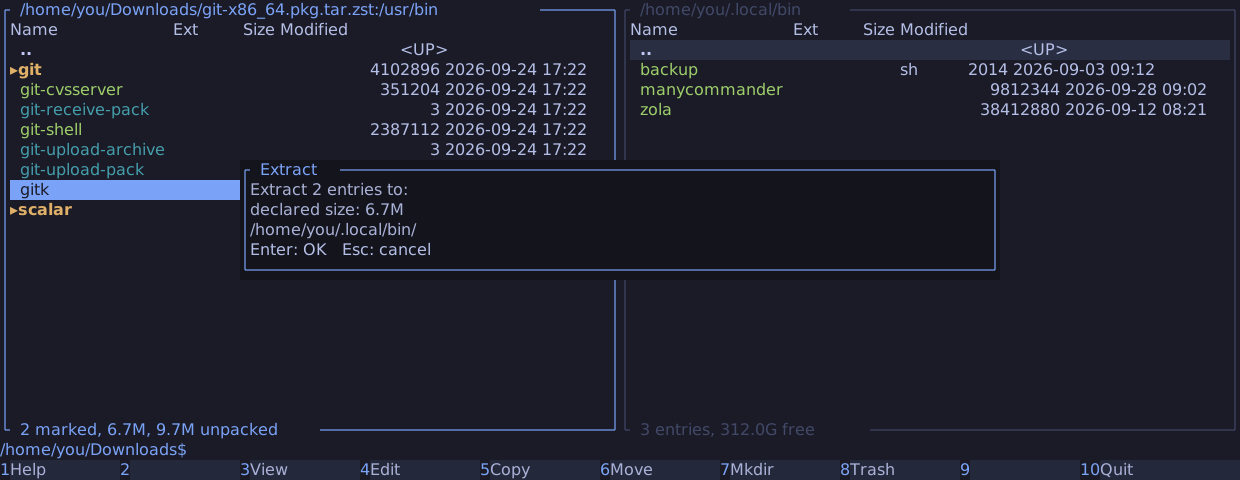
Extraction is a copy with an archive as its source. It keeps the copy's guarantees and questions, and adds its own: file operations lists them.
A tar, plain or compressed, is extracted in one pass through its stream, and a solid 7z in one pass through each block that holds a selected member: every member is read once. When reading a member fails after some of its bytes, Retry fails with "the archive is read in one pass; this member cannot be read again". Skip it and extract it again afterwards. Zip members, and members of a 7z that is not solid, are read directly and can be retried.
What an archive panel refuses
A refusal is a message on the status line; nothing happens.
| Key | Message |
|---|---|
F6, F7, F8, Shift+F4, Shift+F6, Shift+F8, Alt+A, Ctrl+M in an archive | "archives are read-only" |
F5 or F6 into an archive panel | "archives are read-only" |
Alt+F7, Alt+L, Alt+P in an archive | "not in an archive" |
F5 from an archive into a server panel | "copy through a local directory" |
Alt+O on a member | "nested archives are not supported; extract it first" |
Shift+F2 by content | "not in an archive"; compare by date and size works |
Encrypted members and 7z
- Encrypted zip entries are listed. Viewing or extracting one fails with "encrypted".
- 7z members compressed with a method the reader lacks, such as zstd or PPMd, are listed. Viewing or extracting them fails with "unsupported compression method".
- 7z members encrypted with AES are listed and never decoded: "encrypted". A 7z whose header is encrypted does not open: "the archive is encrypted".
manycommander does not write or pack archives, open an archive inside an archive, search inside archives, or read multi-volume archives, rar, iso or cpio.